From 7 August (today), Apple is rolling out a major Maps update in Singapore – and not just any update. I’m talking about the Detailed City Experience, which brings ultra-precise navigation, stunning 3D landmarks, and better driving visuals, right to your iPhone.
It’s a pretty big deal. Singapore is the first country in Southeast Asia to get this treatment, and honestly? It’s about time – and just in time for National Day.
So, What’s the “Detailed City Experience”?
If you’ve ever tried using Apple Maps around Orchard or the CBD and found yourself wondering “Wait… where’s that left turn again?” – this update is for you. Apple has completely rebuilt the Maps experience from the ground up, and Singapore now joins a short list of global cities (think: London, New York, Tokyo) with this upgraded view.
This isn’t just about prettier graphics. It’s designed to make daily navigation easier, safer, and more intuitive – whether you’re walking to a hawker centre, cycling through East Coast Park, or driving to that new cafe your friend found on TikTok.
What’s New in Apple Maps Singapore?
1. Hyper-Detailed Roads and Transit Views
You’ll now see super-clear road markings, bus lanes, medians, crosswalks, and even turn lanes – all visible in real-time. No more guessing if that tiny street near Bugis is a one-way or whether the bus stop’s on your side of the road.
Public transport details have also been sharpened – ideal for anyone who’s ever stood at Outram Park Station wondering if the Thomson-East Coast Line exit is that way or the other way.
Source: Apple
2. Gorgeous 3D Landmarks
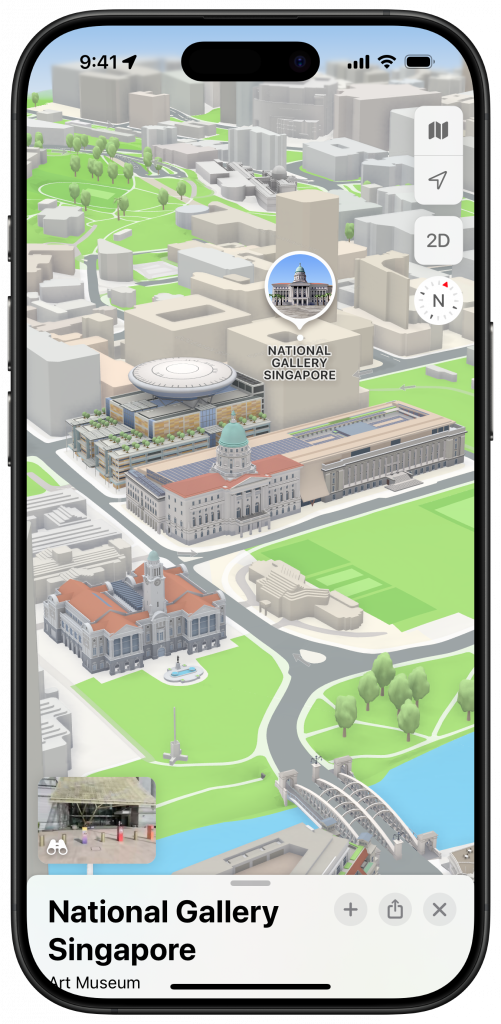
Some of Singapore’s most iconic sights now have custom-designed 3D models in Maps. Expect to spot:
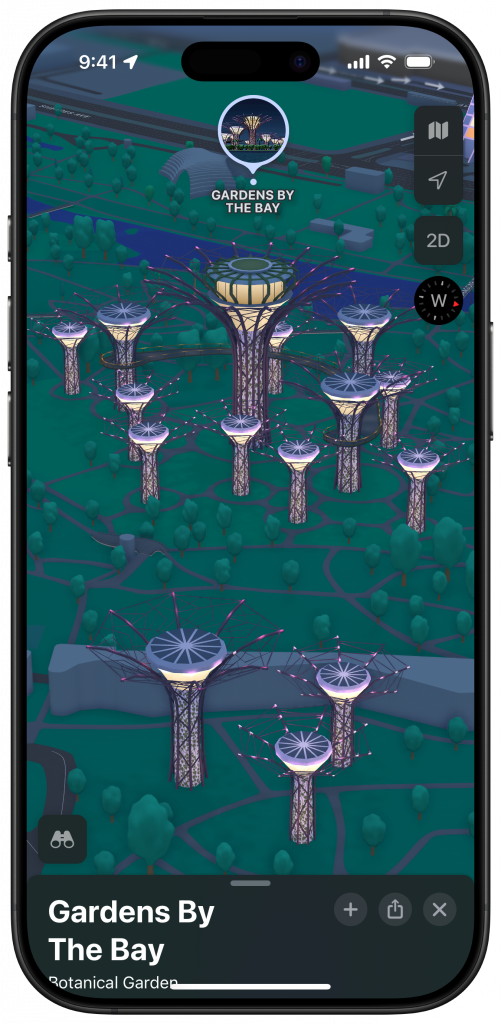
- Gardens by the Bay (you can practically see the SuperTrees)
- National Gallery
- Victoria Theatre & Concert Hall
- …and likely more local gems to come.
It’s a visual treat – even if you’re not navigating, just zooming in on these 3D models feels like a mini virtual tour of the city. (Fun tip: try showing this to your parents and watch them go “Wah, so nice ah?”)
Source: Apple
3. “Windshield View” for Drivers
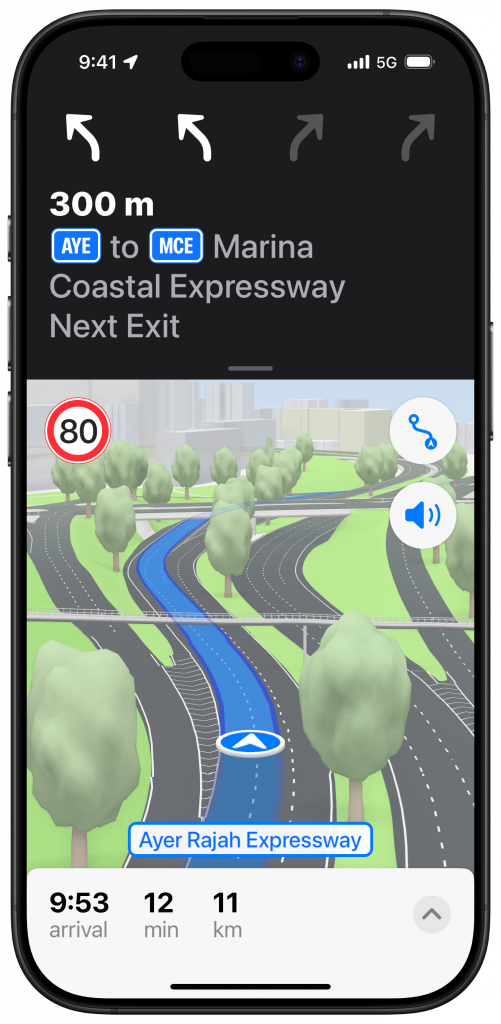
Here’s one for drivers: when approaching complicated interchanges (looking at you, PIE exit near Toa Payoh), Maps now switches to a road-level view. You’ll get a clearer visual of the best lane to stay in and what turns are coming up, so you’re not swerving at the last second.
Perfect for weekend drives to a cafe you’ve never been to – or just surviving peak hour traffic.
Source: Apple
4. Night Mode with Moonlight Glow
When dusk hits, Apple Maps now switches to a beautiful night time mode — think of it like your digital co-driver turning on mood lighting. Everything gets a soft, moonlit tint that’s easy on the eyes but still easy to read.
Why This Update Matters
In a city like Singapore where every minute counts, good navigation makes a real difference – especially when you’re juggling MRT transfers, ERP gantries, or trying to figure out whether that tiny back road actually gets you to the carpark entrance.
This update finally puts Apple Maps closer to what Google Maps has been doing well for years – and in some ways, it’s now even better. The visuals are cleaner, transitions are smoother, and if you’re deep in the Apple ecosystem (iPhone + Apple Watch + CarPlay), the seamless integration makes it feel very polished. Try navigating around Singapore over the National Day weekend if you’re headed out with friends and / or family!